Word Spells: Game for Adults
- 4.8
- Rating
- 10.00M
- Installs
- Free
- Price
 Analysis by App-foxy
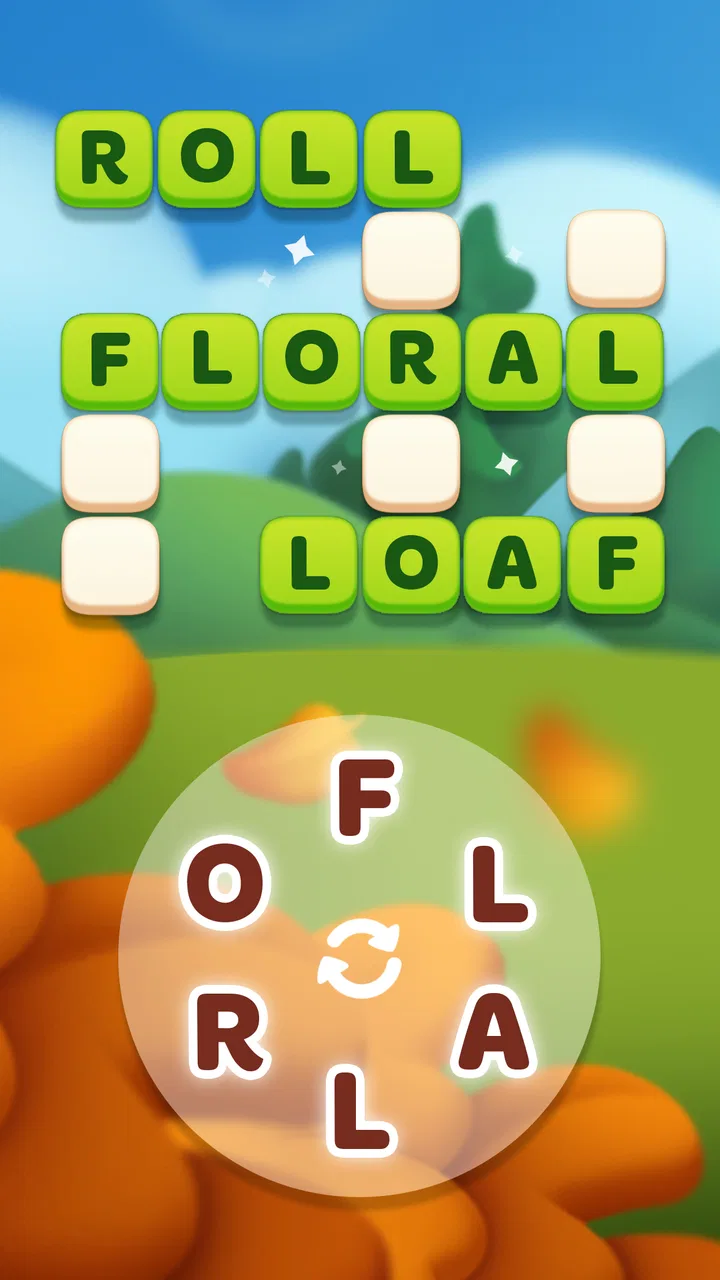
I spent time with Word Spells: Game for Adults as a quiet word puzzle rather than a competitive game, and that distinction matters. It is built around arranging letters into words, so the appeal comes from noticing patterns, testing possibilities, and gradually improving your vocabulary instincts. I found it easiest to enjoy in short sessions: a few minutes while waiting, a relaxed break after work, or a longer stretch when I wanted something absorbing without the pressure of a timer-heavy action game.
Malpa Games presents it as a free word game for adults, and the basic idea is approachable from the first puzzle. The game is rated Everyone, runs on Android 8.0 or later, and its current version is 2.48. It has also become a widely used choice in its niche, with an average rating of 4.8 from around 271 thousand ratings and more than 10 million installs. Those figures do not replace personal experience, but they do match my impression that this is designed for broad accessibility rather than for a small group of specialist word-game fans.
How I settled into the everyday puzzle routine
The most comfortable way to play is to treat each level as a small mental reset. I begin by scanning the available letters without immediately trying to force a long answer. Short words often reveal the useful letter combinations, and once I have a few of those in mind, longer possibilities become easier to spot. This simple order is more effective than tapping randomly because it turns the board into a set of recognizable fragments instead of a collection of isolated characters.
You May Also Like

 Blood Strike: 2.5 Anniversary
Blood Strike’s Loadouts Turn Every Drop Into a Tactical Gamble
A close look at Blood Strike’s custom loadouts: how fast access to signature weapons reshapes its battle royale rhythm, rewards preparation, and narrows the gap between fights.

 Pandora - Music & Podcasts
Pandora’s Music Is Easy to Start, but Harder to Recover
Pandora’s strength is its low-effort path from a seed to a station. Its weak spot is how much confidence it asks you to place in connection, setup, and quiet recovery.

 8 Ball Pool
 Is Built on Rivalries, Rematches, and Routine
A close look at the rivalries, rematches, shared routines, and unanswered safety questions that turn a quick pool match into a persistent mobile community.

 Samsung Music
’s Quiet Strength Is Playing What You Already Own
Its reach comes less from spectacle than from dependable access to a personal library. That simplicity is both the app’s strongest retention engine and its ceiling.

 AccuWeather: Weather Radar
AccuWeather Review: A Quick, Clear Forecast for Everyday Decisions
For everyday plans, the best forecast is the one you can understand quickly. AccuWeather makes rain timing, radar, and local conditions easy to act on, with a few trade-offs.

 Hill Climb Racing
Why Hill Climb Racing Still Turns Crashes Into One More Run
A tiny car, a bumpy hill and one more upgrade: Hill Climb Racing keeps resurfacing because its simple chaos makes every near-miss feel personal.
More From Our News Desk



That approach also makes the game suitable for interrupted play. If I put the phone down after finding a few words, I can return and continue looking at the remaining letters without needing to remember a complicated story or a chain of events. For commuters, people taking a coffee break, or anyone who likes a low-stakes activity before bed, that continuity is a real strength.
The offline-friendly design is particularly useful in those situations. I do not need to make the game part of a larger social routine or wait for another player to be available. It works as a self-contained letter puzzle, which is why I would choose it over a multiplayer word game when I want concentration without conversation, notifications from opponents, or the feeling that I am falling behind someone else.
There is a useful difference between playing casually and playing deliberately. Casual play means taking the first obvious words and moving on. Deliberate play means pausing before using a hint, checking whether a familiar ending can form another word, and treating every unsolved space as a clue about the letters that remain. I recommend the second approach if you want the game to exercise observation rather than simply fill spare time.
A practical routine for short sessions
My repeatable routine is simple. I first identify vowels and common letter pairs, then search for the smallest words that can be made from them. After that, I look for possible endings and beginnings, especially when a remaining letter seems awkward on its own. Only when the board stops giving me useful signals do I consider assistance. This prevents the game from becoming a sequence of immediate guesses and keeps the satisfaction of solving most of the puzzle in my own hands.
One non-obvious benefit of this habit is that it reduces visual overload. When every letter is considered at once, it is easy to overlook a word because the board feels busy. Grouping letters mentally by likely use gives me a smaller number of choices to inspect. It is not a special feature or a hidden mode; it is simply a better way to use the puzzle format.
I also avoid playing too quickly after a mistake. A failed guess can make me repeat the same pattern, particularly when I am convinced that a word should be accepted. Taking a short pause and rebuilding the word from the remaining letters usually exposes whether I missed a different arrangement or was relying on a spelling that does not fit the puzzle. That pause is more productive than pressing through frustration.
Settings and purchase choices worth considering
Before settling into regular play, I would check the available in-game settings on your device and look at how the game presents sound, notifications, and other basic preferences. The exact options can vary with the version and platform, so I would not assume that every installation behaves identically. The useful principle is to remove anything that interrupts the kind of session you want. For a bedtime puzzle, quiet operation is preferable; for a more energetic break, feedback can make each solved word feel more immediate.
Because the game is free to download, it is easy to try without making a commitment. In-app purchases range from $0.99 to $99.99 per item, so I would approach optional spending carefully rather than treating the free entry point as a promise that every useful aid will remain cost-free. I prefer to play several sessions first, learn the normal rhythm, and decide whether any purchase genuinely improves my experience instead of buying simply because I am stuck on one difficult board.
This is also where a personal rule helps. I would not use a paid aid as the first response to a hard puzzle. Give yourself a fixed number of fresh attempts, change your method, and only then consider whether continuing is worth it. The point is not to avoid every optional purchase; it is to make sure the purchase supports your enjoyment rather than replacing the part of the game you actually came to play.
Parents should also note the Everyone age rating when deciding whether the game fits a shared device. That rating makes it broadly approachable, but the word-game format may still be more appealing to older children and adults who enjoy vocabulary puzzles than to very young players who expect animation or rapid action. I would judge it by the player’s interest in letters, not only by the age label.
Patterns that make solving faster
Experienced play is less about knowing every word and more about managing attention. I look for common prefixes and suffixes before I search for unusual vocabulary. A familiar beginning can suggest several possible completions, while a common ending can reveal that the remaining letters are not as random as they first appeared. This is especially helpful when a puzzle seems to contain one difficult word that is blocking progress.
Another useful technique is to separate certainty from possibility. I mentally mark words that are almost certainly present and keep uncertain combinations in a second group. That prevents a speculative guess from taking over the whole board. If the likely words disappear quickly, I return to the uncertain group with a clearer view of the letters that are still unused.
I also recommend reading the available letters in more than one direction. Many players naturally search from left to right, even when the layout does not require that order. Reversing the scan, starting from the most unusual letter, or pairing that letter with each vowel can expose patterns that a normal reading habit hides. This small change is one of the fastest ways to make a familiar puzzle feel less repetitive.
When I am playing during a short break, I use a two-pass method. The first pass is for obvious words and quick progress. The second is for the leftovers, where I deliberately slow down and test alternate arrangements. That keeps the opening minutes satisfying while reserving enough attention for the harder part. It is a better compromise than either rushing every level or overthinking the easiest answers.
Hints, where available within the game’s play flow, should be treated as a learning tool rather than a button to press automatically. If I use one, I try to understand why I missed the word. Was the pattern unfamiliar, did I ignore a short combination, or did I focus too heavily on a long answer? That reflection makes the next puzzle easier. Without it, assistance may solve the immediate problem but leave the same blind spot intact.
Where the relaxed format has limits
The same calm structure that makes this game approachable may disappoint players who want constant novelty or a strong competitive layer. This is a word puzzle, not a fast arcade challenge. If your ideal mobile game depends on real-time opponents, dramatic progression, or complex strategic systems, you may find Word Spells too gentle. I would choose a competitive word app instead when rankings, head-to-head matches, or social pressure are the main motivation.
It is also not the best choice for someone looking for a serious language-learning course. Solving words can strengthen recognition and encourage curiosity, but it does not automatically provide pronunciation practice, grammar lessons, definitions, or a structured curriculum. I would pair it with a dedicated learning app if your goal is to build a new language systematically. Here, the focus is the pleasure of finding the answer, not a complete educational program.
Vocabulary level can create another trade-off. A player with a broad word bank may move quickly through familiar patterns, while someone less comfortable with English word puzzles may need more patience. That does not make the game inaccessible, but it changes the experience. I would recommend starting without trying to solve every board at maximum speed. Letting recognition develop naturally is less discouraging than measuring yourself against an imagined expert pace.
There is also a risk of routine fatigue. Because the central action remains letter solving, long sessions can begin to feel similar if you approach every board in exactly the same way. My solution is to vary the purpose of a session: play quickly when I want a break, play slowly when I want concentration, or focus on solving without assistance when I want a challenge. That does not change the underlying game, but it gives the same format more than one use.
The free model deserves a realistic look as well. Downloading costs nothing, which makes experimenting easy, but optional items can become tempting when progress slows or a puzzle resists several attempts. I would recommend deciding in advance whether you are comfortable spending money on convenience. Players who want a completely uninterrupted, no-purchase experience should inspect the in-game flow early and stop if the monetization becomes more prominent than the puzzle itself.
Who will get the most from it
I think this game suits people who enjoy word searches but want something more focused than a large dictionary or a paper puzzle book. It is especially good for short, private sessions where you want your attention occupied without committing to a story, a match, or a complicated ruleset. The offline capability makes it practical for travel and unreliable connections, while the Everyone rating keeps it suitable for a wide range of casual players.
It can also work well as a shared, low-pressure activity. Two people can look at the same puzzle and suggest possible words without needing to compete formally. I like that arrangement for families or friends who enjoy language but do not want the tension of a timed duel. The game becomes a conversation starter about spelling and word patterns rather than merely a test of speed.
I would skip it if you dislike repetition, have little interest in vocabulary, or need a game with a clear narrative destination. I would also look elsewhere if you want detailed progress analytics, a formal lesson plan, or a strong online community. Those are not minor preferences; they change what makes a word game satisfying. This one is at its best when the act of finding letters is enough.
My verdict after building a repeatable habit
Word Spells works because it keeps the central decision clear: look at the letters, recognize a pattern, and find the word. I appreciate that it can be played offline and that it does not demand a large time commitment. The strongest experience comes from using a deliberate routine, checking preferences before settling in, and resisting the urge to solve every obstacle with immediate assistance.
Malpa Games has made a free word title that is easy to recommend to casual puzzle fans, especially those who want a calm alternative to competitive word apps. Its large audience and 4.8 average rating suggest that the format connects with many players, and my own experience explains why: the rules are quick to understand, but careful observation gives the simple idea more depth than the first few puzzles might suggest.
My recommendation is qualified but positive. Try it if you want a relaxing letter game for spare moments, travel, or a quiet evening. Give it a fair test using the two-pass method before deciding whether it is too easy or too repetitive. If you need competition, structured education, or elaborate progression, another category of word app will serve you better. For everyone else, the best way to enjoy Word Spells is to treat it as a small daily exercise in attention, not a race to finish as quickly as possible.
FAQs for Word Spells: Game for Adults
01What is Word Spells: Game for Adults?
Word Spells: Game for Adults is a challenging word puzzle game designed specifically for mature players. It combines elements of classic word games with new twists to provide an engaging and stimulating experience. Players are tasked with forming words from a given set of letters to advance through levels.
02Is Word Spells: Game for Adults free to play?
Yes, Word Spells: Game for Adults is free to download and play. However, it offers in-app purchases that can enhance gameplay, such as hints or additional levels. These purchases are optional, and players can enjoy the full game without spending money if they choose to.
03What platforms is Word Spells: Game for Adults available on?
Word Spells: Game for Adults is available on both Android and iOS platforms. Players can download the game from the Google Play Store or the Apple App Store, ensuring compatibility with a wide range of smartphones and tablets. Regular updates keep the game running smoothly across devices.
04Does Word Spells: Game for Adults require an internet connection?
Word Spells: Game for Adults can be played offline, making it a great option for on-the-go gaming. However, an internet connection is required for certain features, such as downloading updates and participating in online leaderboards or events, which enhance the gaming experience.
05What age group is Word Spells: Game for Adults suitable for?
While the game is designed for adults, it is suitable for anyone over the age of 12. The puzzles can be quite challenging, making it more enjoyable for mature players who appreciate complex wordplay. The content is appropriate and focuses on vocabulary and cognitive skills development.
Pros
- Engaging word puzzles boost vocabulary.
- Visually appealing design with smooth UI.
- Regular updates with new levels and challenges.
- Offline mode available for uninterrupted play.
- Daily rewards and bonuses keep players motivated.
Cons
- Ads can be intrusive during gameplay.
- Some levels may seem repetitive over time.
- In-app purchases can be expensive.
- Limited free hints available without purchase.
- Requires internet for certain features and updates.

Word Spells: Game for Adults
Gallery